
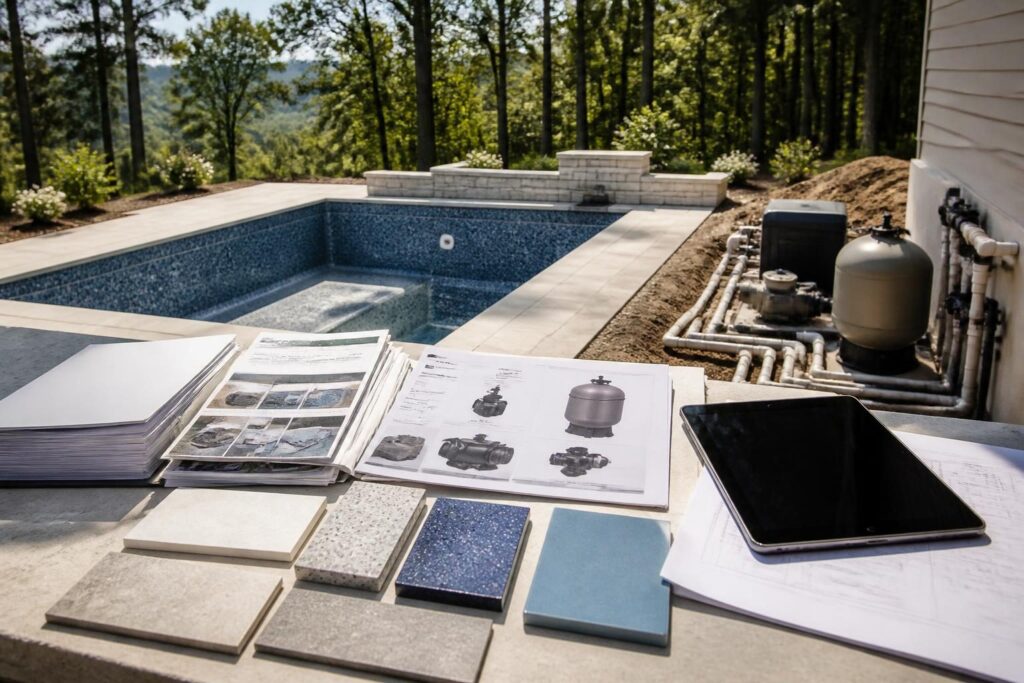
When a pool project includes many products, a pool construction material submittals homeowner record can connect each installed item to its product data, model number, finish, and installation instructions. That information helps you review selections before installation. It also supports routine maintenance, warranty questions, repairs, and future replacement.

A material submittal is product information that a contractor supplies for review before installing a material or piece of equipment. It may include a manufacturer data sheet, shop drawing, color chart, installation guide, technical specification, or approval document. The exact process depends on the contract and the builder’s workflow.
North Carolina projects can involve different local requirements, adopted codes, site conditions, and inspection processes. Treat this article as a documentation guide, not as approval of a product or installation. Ask the pool contractor which documents are available. Confirm technical, electrical, structural, drainage, and code questions with the appropriate qualified professional.
Why request a pool construction material submittals homeowner record?
Product names alone do not identify an installed system. Pump families may have several motor sizes. Light fixtures may have different niches, transformers, lenses, or control connections. Finish lines may include several colors and textures. Records should make those distinctions clear.
A complete file gives you a reference point for decisions made during construction. It can help answer practical questions such as:
- Which filter model did the contractor install?
- What finish color and product line did you select?
- Which installation guide applies to the equipment?
- What replacement part or compatible accessory should a service professional investigate?
- Which product documents did the project team review or accept before installation?
Documentation does not replace a warranty, inspection, permit, manufacturer approval, or professional evaluation. It preserves information that can otherwise disappear when packaging, labels, and project emails leave the site.
What product data should the file contain?
Start with a product index. Give each item a simple identifier, such as “P-01 pump” or “F-02 interior finish.” Save the related document under the same identifier. This makes the file easier to search later.
Capture identity and application
For each material or product, request enough information to identify its intended use. A pool construction material submittals homeowner record may include:
- Manufacturer and product family
- Exact model, series, or catalog number
- Intended location or application
- Size, capacity, color, texture, or configuration
- Revision date of the data sheet or guide
- Applicable accessories, fittings, controls, or companion products
- Manufacturer contact or support information shown on the document
Ask whether the listed item matches the specified product, represents an approved substitution, or reflects a field-selected option. Do not assume that two products are interchangeable because they look similar. A substitution may affect fittings, controls, operating instructions, appearance, or warranty terms.
Keep product data with the contract section, allowance, or change order that relates to it. That connection can explain whether the product formed part of the original scope or entered the project later.
Model numbers and equipment records
Equipment records deserve special attention because model numbers often determine service procedures and replacement options. Photograph permanent labels after installation, but also keep written model and serial numbers in the index. Labels can fade, become dirty, or become difficult to reach.
For pumps, filters, heaters, salt systems, automation panels, transformers, and other equipment, request:
- Model and serial number
- Electrical rating shown by the manufacturer
- Installation and operating manuals
- Required clearances or ventilation information
- Plumbing connection sizes and fitting details
- Control, communication, or automation compatibility notes
- Routine maintenance instructions
- Warranty registration instructions and coverage terms
Do not use a model number to perform electrical work or change equipment settings on your own. A licensed electrician or other qualified professional should address electrical connections, bonding, grounding, disconnects, and code-related questions. Keep manufacturer instructions available to that professional.
Service access belongs in the record too. Note the equipment location, removable panels, shutoff points, and access limitations shown in the project documents. For related planning, see planning for future equipment replacement access.
Finish selections need more than a color name
Interior finishes, tile, coping, decking, grout, plaster, aggregate, and exposed decorative materials can become difficult to identify after installation. A color name may not suffice because manufacturers can offer similar names across different product lines.
Request a finish record that includes:
- Manufacturer and exact product line
- Color name and color code, if available
- Texture, aggregate, pattern, or surface grade
- Tile size, shape, pattern, and layout information
- Coping and deck material selections
- Grout, sealant, adhesive, or joint material information
- Approved samples or selection sheets
- Location where each finish went
Ask for a dated photograph of approved physical samples when practical. The photograph should show the sample clearly, without suggesting that lighting or camera color exactly represents the installed finish. Retain the original selection sheet as the primary record.
For a concrete pool, also ask which documents describe the selected interior finish and any manufacturer or applicator instructions for startup and early care. For a vinyl liner, retain the liner pattern, material information, fitting details, and measurements supplied for future reference. Related records appear in future liner replacement planning.
Installation instructions and field notes
Installation instructions explain how a product should be handled, installed, started, cleaned, winterized, or repaired. They may also identify limits that are not obvious from the finished work.
Request current instructions for each significant product. Keep documents for:
- Pool finishes and specialty coatings
- Waterline tile, coping, sealants, and deck materials
- Drains, skimmers, returns, fittings, and niche components
- Pumps, filters, heaters, sanitizing systems, and automation
- Pool covers, anchors, tracks, and operating hardware
- Lighting fixtures, niches, transformers, and controls
- Water-treatment accessories and chemical feeders
Ask the contractor to identify the instructions that apply to your exact installation. A general manual may cover several models or configurations. The relevant pages may prove more useful than a large, unmarked document.
Field notes can add context. Record installation dates when provided, product locations, visible labels, selected settings at handover, and manufacturer-required startup steps. Do not record a guessed date or setting. Mark unknown information as “not provided” and ask whether someone can confirm it.
How to review submittals before installation
Review does not mean independently approving technical work. It means checking whether the documents match your contract, selections, and intended use before the product is concealed or installed.
Use this homeowner review sequence:
- Compare the product name and model with the contract, allowance, proposal, or change order.
- Check the listed color, finish, size, capacity, and quantity.
- Confirm the proposed location or application.
- Look for accessories and companion parts that the system needs.
- Ask whether the document describes a substitution or revision.
- Write questions in one dated list and request written answers.
- Save the reviewed document with its revision date and status.
Use clear status labels such as “requested,” “received,” “questioned,” “selected,” “substituted,” or “installed.” Avoid labeling a product “approved” unless the responsible party has formally used that term and its meaning is clear in the contract.
Pay attention to items that concrete, soil, decking, plaster, or landscaping will conceal. Before concealment, request photographs and available records showing locations, connections, and product identifiers. Your related pool plumbing as-built record can complement these material documents.
Build a practical digital and paper file
A useful record should be easy to find during a service call. Create folders by phase or system, then use consistent file names. For example: “Equipment / P-01 Pump / Manufacturer Manual / Model 1234 / 2026-08.” Use the actual model and date only when confirmed.
Keep at least one offline copy of important documents. A cloud folder can help with access, but it should not serve as your only copy. Preserve original emails that explain substitutions, selection changes, or installation questions. Export attachments and keep each related message with them.
At handover, ask for a final index rather than a box of mixed manuals. The index should identify missing documents and explain who will provide them. Compare the equipment list with records collected during the project. The heater startup record guide offers a useful example of equipment-specific documentation.
Questions to ask before closing the file
Before considering the record complete, ask:
- Are these the exact products installed, or are any substitutions still undocumented?
- Which model and serial numbers came from the installed labels?
- Which finish samples and color codes match each installed area?
- Are installation, startup, cleaning, and winterization instructions included?
- Which documents belong to the manufacturer warranty file?
- Are replacement parts, fittings, or accessories identified?
- Did site conditions or the final configuration change any instructions?
- Which records should go to an electrician, pool service company, or future owner?
Keep the answers with the final documents. If a record is unavailable, note that fact instead of filling the gap with an assumption. That discipline keeps the pool construction material submittals homeowner record useful without overstating what the file proves.
When to involve a qualified professional
Ask the local inspections department about current permit, inspection, and code-documentation questions. A licensed pool contractor can explain product compatibility and installation records. For contractor licensing information, review the North Carolina Licensing Board for General Contractors consumer overview.
Use a licensed electrician for electrical questions. Consult an engineer, surveyor, septic professional, or other qualified specialist when site conditions require that expertise. Build a Pool in North Carolina can help homeowners organize questions, but local authorities and qualified professionals control project-specific decisions.